
This post will discuss two aspects of my favorite programming language, C++:
- The difficulty refactoring it
- Why I enjoy it anyway
Prelude:
This blog entry was born in spirit, a few weeks ago Friday night at about 11:30 pm, when I changed the following code (taken from ACIS, but disguised a bit to protect the guilty)
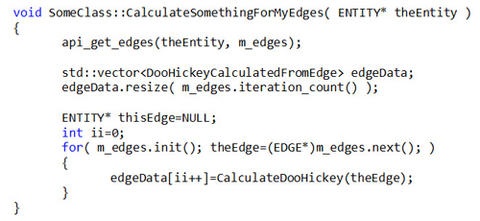
into
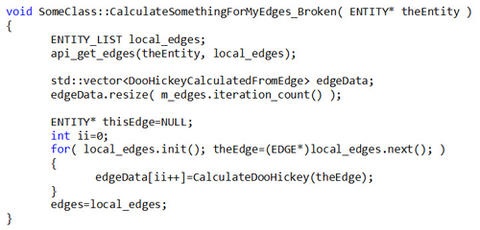
If it entertains you, please take a minute to see where the mistake is. Probably the first mistake is messing around with the code at 11:30 pm. But there are so many interesting things to work on, and so little time, occasionally I bend the rules. I made this change because CalculateDoHickey was a data member of SomeClass which used the count of things in m_edges to determine if it needed to do a particular calculation.
What was the problem that caused this code to access violate and unpredictably fail? I replaced the variable edges by local_edges in every place, except where I Resized the vector used for storing the DooHickeyCalculatedFromEdge data. Then I assigned to edgeData[ii++]. In the first version of the code, edgeData will always be large enough to hold a DooHickey for each element of the list edges.
Refactoring Tools:
Like most problematic bits of coding, the mistake above had a lot of causes. Because I ran the acceptance test suite about twenty minutes after making the mistake above, I quickly noticed the problem and fixed it.
The sooner you can catch a mistake, the less costly it is to fix. Logically then, the cheapest mistake is the mistake you never make. One way to avoid making mistakes is to use refactoring tools. The change I was trying to make isn’t strictly a refactoring that I know of, but it isn’t that far off either: the following steps would allow one to do it correctly.
- Comment out the data member edges from SomeClass
- Fix compile errors caused by (1) by commenting out all code dealing with edges except the code in CalculateSomethingForMyEdges. In CalculateSomethingForMyEdges, replace edges with the local variable local_edges.
- Restore all the stuff you commented out in step 2
Alternatively, I could have used reserve (to allocate enough memory) and push_back to add the results to the vector. If the block of memory owned by the vector is too small, push_back will correct the problem with the small cost of some extra allocations.
Usually when I run into a big problem, the best thing to do is step away from it for a few minutes to think about the big picture. Big problems often arise when you are trying to do something in a way that is basically wrong.
On the few occasions where I have used Java or C#, I have been very impressed with the refactoring and editing facilities in Eclipse and Visual Studio, respectively. Unfortunately, my mother tongue is C++. Great Java and C# tools don’t help me much. Also, watching myself code in these languages, I am not sure the result is any better.
Visual Studio 2010 is a big improvement for editing C++ over earlier versions. The header file name auto completion and red underlines when you write code that doesn’t compile make things much quicker. But it still seems like tools for C++ are cruder than some other languages. For me coding is basically a two step process: randomly pace around the building bouncing a little rubber ball I keep in my pocket, until I understand what changes I need to make. This ball bouncing may occasionally be interrupted by reading math text books or drinking caffeinated beverages. The second step after thinking thoroughly about what needs to be done is to sit down and crank out whatever code changes need to be made. As far as I can tell, the first bit is a 'right brain' dominated activity, while the second is 'left brained'. The last step involves debugging and verifying that the changes do what they’re supposed to.
The challenge here is that computers generally have a much better 'left brain' then I do. The parsers used by major I.D.E.s can very quickly parse a huge source file and find whether it is well formed in your favorite programming language.
C++ is still better:
The enhanced refactoring tools, well-thought-out designs, and garbage collection make some people recommend using some more 'modern' languages than C++. I still would rather use C++ for three reasons:
- Zero overhead principal. If you don’t benefit from a language feature, it shouldn’t cost you anything. With Java and C# you end up paying for garbage collection even when your program could have been written only using stack based allocations in C. Needing to make a using block to get the same benefits C++ gives by default with stack variables annoys me.
- C++ is to computer languages as English is to human languages. It is hard to learn, has several widely disparate origins, and you can still be widely understood if you break the rules.
- ACIS and CGM are written in C++. It is easier to be really good at one language then many.
C++ and a good optimizing compiler lets you write code that is almost as efficient as assembly code, but has enough high level features – support for polymorphism, templates, operator->, etc – to enhance productivity significantly over just using assembly or C.
So what do I do now?
- Chase the compiler whenever possible: certain changes will cause things to fail to build. This is often a good way to accomplish “refactor”-like changes.
- Look for better refactoring tools.
- Use smart pointers/RAII to avoid garbage collection errors.
- Do you have any suggestions?
.png?width=450&name=AdobeStock_188705270%20(2).png)




.jpg?width=450&name=Application%20Lifecycle%20Management%20(1).jpg)