
Recently I was looking at some surfacing operations and I thought it would make an interesting case study to complete the entire workflow of building a 3D solid model from a set of surfaces. My idea was simply to join the surfaces together and then thicken the resulting sheet body to make a thin walled solid.
I chose the Utah teapot1, created by Martin Newell at the University of Utah in 1975. This data was originally created for graphics developers to use as test data for lighting and rendering algorithms and it is simply a set of surfaces representing the exterior of the teapot, extending as far as the visible portion but without any of the internal details such as the inner faces.
Creating the Surfaces from the Input Data
The data consists of 32 Bezier patches together with a code snippet to read them. I adapted the code to read in the patches and created a corresponding set of NURBS sheet bodies with relative ease. I have found it convenient to split the patches into 7 groups to identify them.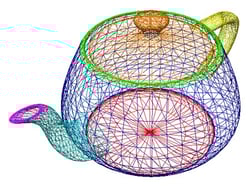
| Color | Description |
|---|---|
| Blue | Sides |
| Green | Rim |
| Turquoise | Spout |
| Magenta | Tip of the Spout |
| Yellow | Handle |
| Orange | Lid |
| Red | Base |
Whilst the data is sufficient for graphical applications, a couple of aspects of the surfaces are different to the ones that I would expect from a 3D modeler. These differences are where the workflow gets interesting.
“Inside” and “Outside” for Sheet Bodies
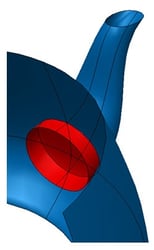
The first issue that is not shown up by a rendering application is that some of the surface patches intersect; both the spout and the handle protrude through to the inside of the teapot sides.
Calculating the intersections between the surfaces is straightforward, however when modeling with sheet bodies there is no concept of “inside” and “outside” and typically an application has to decide which pieces are required and tell the geometry kernel what to keep.
The image shows in red the portions of the spout and teapot sides that are not required, in my workflow I had to specify that I did not wish to keep them.
Thickening Surfaces into Solids
Offsetting a surface is a standard geometric operation and the basis of a thickening operation; however as the offset approaches the radius of curvature cusps are introduced and with further increased offset self-intersections occur. A function of the geometric kernel is to devise strategies to avoid these artifacts in the result of the operation whenever possible.
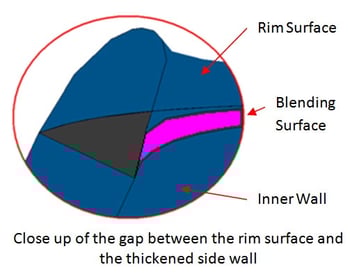
An example of this is the rim, where the patch actually represents both sides of the teapot wall. In fact it does not make sense to thicken the rim at all, instead the strategy I used to was to construct a blend surface which joins the inside of the teapot side with the inside of the rim.
After construction of this blending surface a closed volume is defined, this can then be combined with the side walls into a single solid body.
Completing the Model
To complete my model, the handle and the lid were straightforward, along the lines already described, though the spout required a slightly different thickness and some extra work to make the tip match up.
The workflow I envisaged at the start turned out to be more complex than I thought and on reviewing the code I had written it seemed too involved for a relatively simple model. There is a much simpler way to achieve the same result and that will be the subject of my next article.
Ref 1: Download for the data is at http://www.sjbaker.org/teapot/teaset.tgz)
.png?width=450&name=AdobeStock_188705270%20(2).png)


.jpg?width=450&name=Application%20Lifecycle%20Management%20(1).jpg)