Why offline programming is replacing teach pendant methods in modern robotics
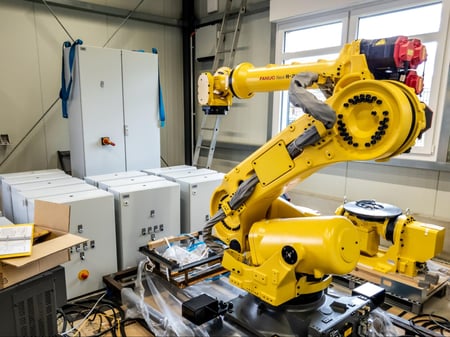
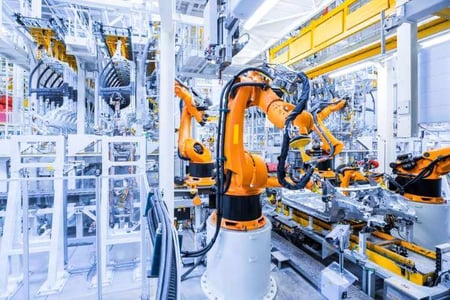
Walk into a traditional robot programming session and you'll find a technician standing inside a fenced robot cell, teach pendant in hand, manually jogging a 200-kilogram arm through space one millimeter at a time. Production is stopped. The robot waits. The clock runs.
This is online programming, and for decades, it was simply how industrial robots got programmed.
The teach pendant itself is a handheld control unit that lets operators move the robot to each desired position, record that position as a waypoint, and chain those waypoints into a motion sequence.
For simple tasks with few positions, it works fine. For complex weld paths across a car body with hundreds of TCP (Tool Center Point) locations? It's genuinely painful.
You're manually repositioning for each point, the programmer is inside a hazardous workspace, and the production line is generating zero output the entire time.
Robot offline programming (OLP) solves all three of those problems at once.
What is offline programming, exactly?
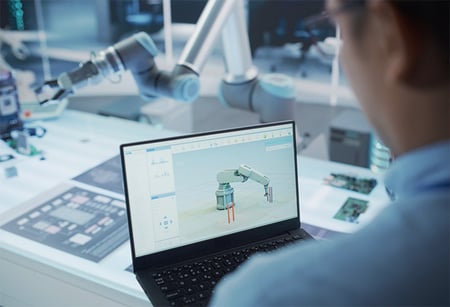
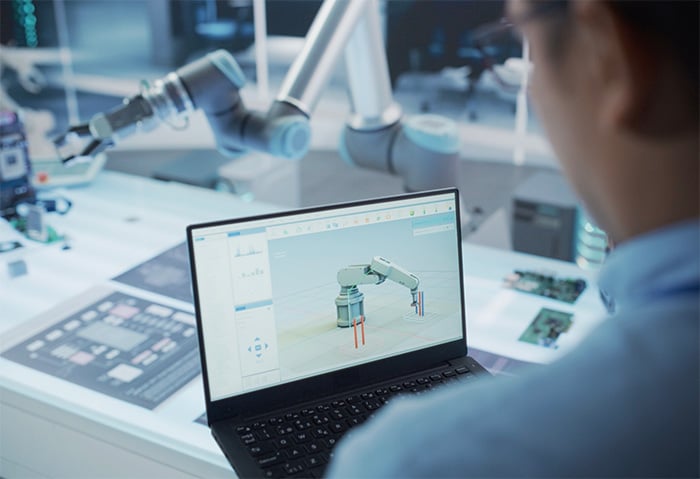
Offline programming in robotics means writing, testing, and validating robot motion programs entirely on a PC, using a virtual replica of the physical robot cell, without ever stopping production or entering the workspace. The robot keeps running its current job while engineers develop the next one in simulation.
This approach works particularly well in structured, predictable environments: arc welding, spot welding, painting, deburring, and assembly operations where the workpiece geometry is known in advance and the robot cell layout is fixed.
The offline robot programming workflow breaks down into roughly seven stages:
- Import CAD data: robots, workpieces, fixtures, and the full cell layout are loaded from native CAD files using translation technology like 3D InterOp.
- Layout the cell: position robots, positioners, and tooling in the virtual environment.
- Generate TCPs: compute Tool Center Points from surface normals and edge geometry.
- Simulate motion: run the full program virtually, checking for collisions and reachability.
- Generate robot code: export native code for ABB, KUKA, FANUC, or whatever controller you're targeting.
- Test on the physical robot: fine-tune with minor adjustments.
- Run production: at full speed, with confidence.
They built their OLP solutions with Spatial SDKs:
- ABB's Robotics Division built their RobotStudio platform on this exact workflow, PC-based robot offline programming software that lets engineers program without production shutdowns.
- Stäubli similarly built their Robotics Suite 2022 around offline simulation capabilities, handling complex multi-robot automation scenarios that would be nearly impossible to program manually at the pendant.
The 3D CAD technology stack behind reliable offline robot programming
If you're building an offline programming software tool for robotics, you're really building a specialized CAD/simulation application. The accuracy of your simulation is only as good as the geometry underneath it. Here's what that stack actually looks like.
CAD data import and interoperability
Every robot cell involves geometry from multiple sources: the robot arm itself from one vendor's CAD system, the workpiece from the customer's CATIA or NX model, fixtures from SolidWorks, and tooling from Creo. These files arrive in different formats with different internal representations, and if your OLP tool can't read them faithfully, your simulation is worthless.
3D InterOp handles this problem with native APIs for reading major CAD formats, CATIA, NX, SolidWorks, Creo, Inventor, without requiring licenses for those applications. Critically, it preserves not just geometry but topology, PMI (Product and Manufacturing Information), and metadata. For OLP purposes, the B-Rep (Boundary Representation) accuracy matters enormously because surface normals derived from that geometry drive TCP placement.
Stäubli specifically called out the drag-and-drop STEP import capability in their Robotics Suite: faster import with less friction means engineers spend time on programming logic, not wrestling with file formats.
Without faithful CAD import, no simulation is accurate. This is the non-negotiable foundation.
Geometric modeling and TCP generation
Once geometry is in the system, the core programming task for applications like welding or deburring is generating TCPs along the workpiece surface or edges. This is where the geometric modeling engine does its heaviest work.
Surface normal evaluation, computing the perpendicular direction at any point on a surface, gives you the robot's approach angle at each TCP.
The CGM Modeler and ACIS Modeler expose this capability programmatically, letting developers query normals across arbitrary B-Rep surfaces to drive precise tool orientation at every waypoint.
For weld seams and deburring paths that follow edges, you need to sample points along curves at controlled intervals. CGM supports arc-length parameterized sampling along edges and wires, meaning TCP spacing is uniform along the actual curve geometry, not just in parameter space, which would otherwise bunch points together in high-curvature regions.
Smooth edge propagation chains adjacent edges into continuous paths, critical for applications where the robot needs G1-continuous motion across multi-segment seams.
Stäubli chose CGM as the geometric engine for their Robotics Suite, and the results they reported are worth quoting directly:
The world of possibilities in the robotics industry is exciting. Robots are the most flexible equipment to automate production. Working with Spatial means working with the leader in 3D environments and gives us even more confidence about the solution that we bring to our customers.
Marketing Manager at Stäubli Robotics
Collision detection
You can have perfect geometry and perfect TCP placement and still generate a robot program that smashes the tool into a fixture. Collision detection is what stands between simulation and disaster.
For robot simulation software, collision detection needs to operate in two modes.
During path simulation, you want real-time continuous checking, is anything touching right now?
Spatial's AGM SpaCD (integrated in the Accelerated Go-to-Market framework) returns a fast true/false on first contact, which is exactly what you need for interactive simulation feedback.
For pre-deployment validation, you want exhaustive checking: return all pairs of colliding bodies, intersection geometry, and pairs of colliding triangles. The standalone SpaCD mode does this, giving developers diagnostic information rather than just a stop signal.
Proactive clash detection using clearance volumes extends this further, rather than detecting contact, you detect when the robot is within a minimum safe distance of an obstacle. This catches problems that contact detection alone misses.
The performance story matters here. A 6-link robot arm simulated through hundreds of path waypoints means thousands of body-pair checks per second. Parallel processing architecture in the collision solver keeps this real-time rather than batch-only.
Visualization
HOOPS Visualize is the rendering layer in most serious 3D robot simulation software tools, and for good reason. Robot cell simulations involve large triangle counts, full production lines with multiple robots, conveyors, fixtures, and workpieces, running as interactive animations. HOOPS handles the rendering performance while preserving selection, highlighting, and scene editing capabilities.
Stäubli's Robotics Suite uses HOOPS alongside CGM and InterOp, and the combination shows up in their user experience numbers:
We saw a significant reduction in the number of mouse clicks within the Suite, with visible results being generated quickly and easily.
That's a visualization and interaction story as much as a geometry story.
Data simplification and bounding volumes
Path planning requires simplified geometry representations for performance. CGM Polyhedra handles discrete mesh representation of B-Rep geometry, giving you mesh versions of surfaces that collision algorithms can process efficiently.
Bounding volume hierarchies, specifically AABB (Axis-Aligned Bounding Boxes) organized in a SpaCD group tree, let the collision solver quickly reject non-colliding body pairs before doing expensive detailed checks. This is standard computational geometry practice, but it needs to be built into the geometry stack from the start, not bolted on afterward.
Developers building industrial robot simulation software should pay attention to this layer. Simulation accuracy requires high-fidelity B-Rep. Simulation performance requires efficient discrete representations. Your tech stack needs both.
Want to go deeper on the technology stack?
- Download Spatial's OLP eBook for more technical details about each Spatial SDKs for robotics applications.
- Or visit the Spatial Robotics industry page to see how these components fit together.
Path planning in robotics, from collision-free motion to autonomous navigation
Collision detection tells you whether two bodies overlap at a given configuration.
Path planning asks a harder question: given a start state and a goal state, find me a sequence of configurations where nothing ever overlaps, subject to kinematic and mechanical constraints.
This is the frontier of robotics programming, and it's where the field is moving fastest.
What path planning actually means
When a programmer specifies TCPs, they're saying "the tool needs to be at position A, then position B, then C."
Path planning figures out how all the robot's links move to get there.
For a 6-link industrial robot arm, each joint has constrained rotation angles, maximum angular velocities, and mechanical limits. The path planner has to find joint trajectories that satisfy all of those constraints simultaneously while keeping every link clear of every obstacle throughout the motion.
This is categorically different from generating TCPs (which is a geometry problem) or detecting collisions at a fixed configuration (which is a spatial query problem). Path planning is a search problem over a continuous, high-dimensional space.
Inputs to a path planning solver
A solver needs a complete description of the world:
- Configuration space: the full layout of the robot cell, including all obstacles and their geometry.
- Mechanical constraints: valid degrees of freedom for each joint, acceleration limits.
- Kinematic model: for each robot link, how position and orientation transform as joints move.
For a 6-link robot arm, given the end effector's target position and orientation, the solver uses inverse kinematics (IK) to compute the joint angles that achieve that pose.
The IK computation returns the transformation, rotation, translation, and parameter change, for each link in the kinematic chain.
There are typically multiple IK solutions for any given end effector pose, and the path planner has to choose among them with continuity and obstacle avoidance in mind.
How the solvers work
Most industrial path planning solvers use tree-based exploration of configuration space, sampling random configurations and connecting them toward the goal while checking for collisions along each candidate segment.
The practical engineering of these solvers involves:
-
Warm starting: reusing prior solutions as starting points for similar configurations, which dramatically reduces planning time for repeated tasks with slight variations.
-
Smoothing: raw tree-based paths tend to be jerky. Post-processing smooths trajectories for jerk-free motion, which matters both for mechanical wear and for applications like painting where smooth motion directly affects quality.
-
Target area vs. target point planning: sometimes the robot needs to reach a specific TCP exactly; other times it just needs to get into a region (for inspection, for instance). Target area planning is faster and finds solutions that target point planning might miss.
Spatial's path planning solver, integrated in the CDS (Constraint Design Solver) and the AGM application framework, handles inverse kinematics, 2D and 3D constraint management, and dynamic simulation.
It includes both a generic solver (for arbitrary robot morphologies) and robot-specific solvers tuned for Universal Robots, KUKA, Yaskawa, and Techman Robot families, because while a generic solver handles any configuration, a solver that knows your specific robot's kinematic structure finds solutions faster and avoids known singularities more reliably.
Diagnostics when no path is found
A good path planner doesn't just fail silently. When the solver can't find a collision-free path, it should tell you why.
Is the target TCP outside the robot's reachable workspace? That's a reachability failure, reconfigure the robot's base position or switch to a different robot model.
Is the robot hitting a singularity, a joint configuration where the kinematic Jacobian loses rank and motion becomes undefined? That's a different problem with a different fix.
Is the clearance constraint too tight for the available space? Maybe the minimum distance parameter needs adjustment, or the fixture needs to be relocated.
Actionable diagnostics distinguish useful offline robot programming software from tools that just show red and let the programmer guess. This is especially important for non-expert users, manufacturing engineers who understand the physical process but aren't robotics specialists.
Real applications driving path planning demand
The use cases pushing path planning hardest right now:
-
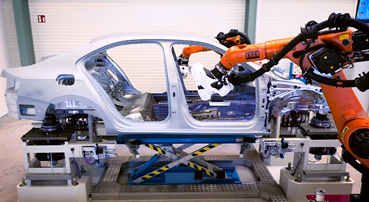
Car body inspection: a robot carrying a measurement probe needs to reach hundreds of measurement points on a complex surface, in a specific order, without any link touching the vehicle body. The path between points is as safety-critical as the points themselves. Spatial's Path Planning car inspection demo addresses exactly this scenario.
-
Arc welding and spot welding: the torch or electrode has orientation constraints at every TCP (weld angle, travel angle), so the path planner has to maintain those constraints while navigating between positions.
-
Deburring: similar to welding, but with contact force considerations, the tool needs to maintain contact with the edge, which means the path planner has to handle constrained motion along a surface rather than free motion between points.
-
Dual-arm robots: assembly, parts carrying, and screw tightening operations increasingly use two coordinated robot arms. Path planning for dual-arm systems means solving two 6-DOF kinematic chains simultaneously with mutual collision avoidance between the arms, a significantly harder problem than single-arm planning.
-
Gantry systems: linear track systems add additional degrees of freedom beyond the robot arm. The solver has to treat the gantry axes as part of the kinematic chain, which changes the reachable workspace calculation and the singularity landscape.
The competitive picture
KineoWorks from Siemens is the established reference implementation for industrial path planning, collision-free motion computation for robots and machine tools with a mature GUI component. It's good software.
It's also expensive in ways that don't make sense for every development budget.
Stäubli evaluated KineoWorks for their Robotics Suite and found the cost-to-value ratio didn't work for their use case, which is why they built on Spatial's component stack instead. Spatial's path planning solver positions as a capable alternative, particularly for OLP ISV customers already using other Spatial components who want a single-vendor stack.
The AGM (Application Graphics Manager) framework is the integration point where this matters most.
AGM brings together HOOPS Visualize, SpaCD, CDS, InterOp, and CGM under one application development framework. For a team building offline programming software for robotics, the alternative to AGM is integrating these components separately, managing data exchange between different geometry representations, maintaining consistency between the visualization layer and the collision detection layer, and building your own application scaffolding. Spatial's documentation puts it plainly: "If not Spatial, the customer has to separate issue one from another. This is time consuming work."
The customer roster reflects that value: ABB, Stäubli, Yaskawa, Daihen, Nachi, Kawasaki and FANUC have all built production software on Spatial components.
These aren't experimental deployments, they're the robot offline programming software tools that manufacturing engineers use every day.
Explore Spatial's robotics technology stack at:
- spatial.com/industries/robotics,
- or download the OLP development guide to see how these components fit into a real offline programming architecture.
- The ABB and Stäubli case studies are worth reading alongside this article, the implementation details there ground a lot of what this guide covers in production reality.