Why you shouldn't build feature recognition and direct editing from scratch
If you're building engineering software — CAD, CAM, simulation, cost estimation, anything that touches 3D geometry — you've probably hit this wall. A customer sends you a STEP file exported from some other tool, and what you get is a bag of surfaces. No feature tree. No design intent. Just "dumb" geometry.
Your application needs to understand what it's looking at: where the holes are, which faces are fillets, what can be safely removed for meshing.
And ideally, your users want to grab a face and drag it somewhere without the model falling apart.
So you start thinking about building feature recognition and direct editing capabilities.
And we're going to be honest with you: unless your company has deep computational geometry expertise and years to burn, don't.
Here's why, and what to do instead.
The problem is harder than it looks
Feature recognition sounds straightforward in the abstract. You have a B-Rep solid. You want to walk its faces and edges, identify patterns, and label them.
A cylindrical face adjacent to a planar face with certain angular relationships? That's probably a hole. A smooth rolling-ball blend between two faces? Fillet.
But the real world is vicious. Counterbored holes have multiple cylindrical segments at different diameters. Countersunk holes involve conical transitions. Variable-radius fillets change curvature along their length, and fillet junctions, where three or more blend surfaces meet at a corner, create geometry that's genuinely difficult to classify.
Then there are slots, pockets, pads, notches, bosses, protrusions, and logos. Each one has its own geometric signature, and those signatures overlap and interact in ways that will keep your team busy for years.
Direct editing is worse. Push/pull sounds simple: the user grabs a planar face and drags it outward. But what happens to the neighboring fillets? They need to stretch or rebuild while maintaining their radii. What about the blend transitions between those fillets? What about the trimming and intersection calculations that have to happen in real time so the user gets visual feedback while dragging? This is deep, specialized work.
The kind of thing where individual algorithms represent person-years of R&D.
We've seen teams underestimate this badly. They prototype something that works on simple test parts, ship it, and then spend the next three years firefighting edge cases from production geometry. Meanwhile, their actual differentiating features — the simulation setup, the toolpath optimization, the cost model — get starved of engineering resources.
What feature recognition gives you
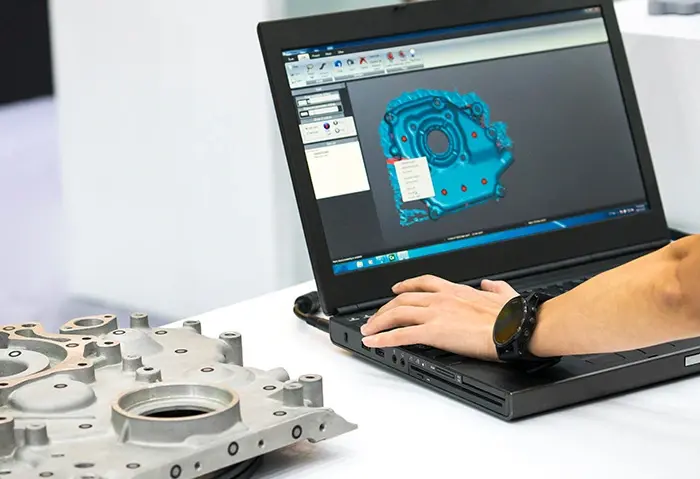
When it works well, feature recognition analyzes a B-Rep body and returns an organized hierarchy of manufacturing features with their parametric data. You iterate through detected features and query their properties.
Concretely, that means:
- Holes with their diameters, depths, and subtypes (simple through-hole, counterbored, countersunk)
- Fillets with radii (constant or variable), including identification of fillet chains and junction regions
- Chamfers with their offset distances and angles
- Slots, pockets, and pads with dimensions and orientations
- Protrusions, bosses, notches, and logos
The important detail here is what "parametric data" means. Some implementations give you face groups — "these 7 faces belong to a feature" — and leave classification and measurement to your application code. Others give you the face groups and the parameters: this is a countersunk hole, 8mm diameter, 12mm deep, with a 90-degree countersink angle. The difference matters enormously for how much work you still have to do on your side.
There's also the question of automation level. Some approaches require your application to provide a seed face — a starting point for the recognition algorithm. Others analyze the whole body automatically and hand back everything they find. If your workflow involves processing hundreds of imported parts with no user interaction, that distinction is the difference between a viable product and a dead end.
For a deeper look at the range of recognizable feature types, including pads, slots, and logos, see the blog post CGM Core Modeler Enhances Feature Recognition.
What direct editing gives you
Direct editing lets users modify geometry without a parametric feature tree. Move a face, offset a surface, apply a transformation — and the model heals itself around the change.
The real value shows up in feature-preserving transformations. When a user pushes a planar face outward by 5mm, the fillet radii on adjacent edges stay constant. The blend surfaces rebuild automatically. The model remains a valid solid throughout. No boolean failures, no torn surfaces, no manual cleanup.
This matters most for design reuse. Your customer gets a part from a supplier and needs to modify it. Or they're working with a legacy design from 15 years ago where the original parametric model is lost (or was built in software they don't have). Or they're exploring concept variations quickly and don't want to build a full parametric model yet. In all these cases, direct editing on imported geometry is the workflow that actually makes sense.
For interactive applications, supporting mouse-driven push/pull — where the user sees the geometry update in real time as they drag — takes this from "useful batch operation" to "core product feature."
Why this is a build-vs-buy decision you should take seriously
The economics here are lopsided. Building feature recognition and direct editing from scratch requires:
- Computational geometry specialists (hard to hire, expensive to keep)
- Years of development before you reach production quality
- Ongoing maintenance as you encounter new edge cases from real-world CAD data
- Testing against geometry from dozens of CAD systems, each with its own modeling quirks
An SDK developed by geometry kernel specialists amortizes that cost across a large user base. You're buying technology backed by many person-years of accumulated IP, tested against diverse real-world geometry, and maintained by people whose entire job is computational geometry.
That frees your team to work on what actually differentiates your product. If you're building CAM software, your competitive advantage is toolpath strategies, not fillet detection. If you're building simulation tools, it's solver technology and meshing intelligence, not push/pull face editing.
We are not saying SDKs are the right answer for literally everyone. If computational geometry is your core business, build it. But for most engineering software companies, this is infrastructure, critical, yes, but not the thing your customers are choosing you for.
Weighing the build-vs-buy tradeoff?
- Spatial's article on reducing development time during application lifecycle management is worth reading.
The five use cases that keep coming up
Across the engineering software landscape, feature recognition and direct editing feed into the same handful of workflows:
1. Model simplification for simulation. FEA and CFD analysts spend an absurd amount of time defeaturing models before meshing. Small fillets, holes for fasteners, cosmetic details — these create tiny mesh elements that blow up element counts and solver times without meaningfully affecting results. Recognize those features, filter by size, remove them automatically.
2. Manufacturing automation. CAM systems need to identify machinable features — holes to drill, pockets to mill, surfaces to turn. Automatic feature recognition turns imported geometry into a manufacturing plan without manual feature mapping.
3. Design reuse. Extract design intent from imported parts, modify geometry with direct editing, adapt to new requirements. This is where the combination of feature recognition and direct editing becomes more than the sum of its parts.
4. Cost estimation. Catalog every feature on a part — count the holes, measure the fillet radii, identify the pocket depths — and feed that into a manufacturing time and cost model. Automation here means quotes in minutes instead of hours.
5. Level-of-detail for visualization. Remove unnecessary geometric detail for real-time rendering. Similar to simulation defeaturing but with different filtering criteria.
Explore how these workflows connect:
- If simulation defeaturing is your use case, take a look at Spatial's CAE workflow solutions, which cover the full import-to-mesh pipeline.
- For manufacturing automation, Spatial has a dedicated CAM industry page showing how these components fit into automated manufacturing workflows.
The defeaturing workflow in practice
Here's what the workflow looks like when everything is connected:
- Import a STEP file (or CATIA, NX, SolidWorks, whatever your customers use)
- Heal the geometry — imported data almost always has gaps, sliver surfaces, tolerance mismatches
- Run feature recognition on the healed body
- Filter results: give me all fillets under 2mm radius, all holes under 5mm diameter
- Remove those features automatically
- Export the simplified model for meshing
Step 2 is easy to overlook and hard to skip. Geometry healing, closing gaps, fixing tolerances, removing sliver faces — has to happen before feature recognition, or you get unreliable results.
Bad input geometry is the number one cause of feature recognition failures in practice.
For a technical explanation of why healing matters and what it actually involves, see Healing in 3D interoperability: preserving design intent across CAD systems and the companion piece 3D Data Translation in 3D Modeling.
Some implementations handle the recognize-and-remove steps as a single operation. You tell the system "remove all fillet chains" or "remove all holes below this diameter" and it does recognition, classification, and removal without the user selecting anything. For batch processing and automated pipelines, that's a significant workflow improvement.
What Spatial's SDKs offer here
Spatial provides a few different components that address this space, and they're worth understanding separately because they have different capabilities:
CGM Modeler
CGM Modeler is the more complete option for feature recognition. It analyzes a body automatically (no seed face selection needed), returns both face groups and parametric data, and supports direct editing operators with feature-preserving transformations. If you need to know that a detected hole is countersunk with specific dimensions, CGM gives you that directly. CGM also supports industry-specific recognition heuristics — different strategies for automotive powertrains versus building construction versus electronics.
3D ACIS Modeler
3D ACIS Modeler handles feature detection differently — it identifies face groups belonging to features but leaves detailed classification and parameter extraction to your application. It also includes a defeature component that can recognize and remove blends by radius threshold. If you're already on ACIS and need defeaturing specifically, this may be sufficient.
CGM Defeaturing
CGM Defeaturing is an add-on focused specifically on automated simplification. It removes hole or fillet features in one step without user input, with filtering controls for size thresholds. Useful when your primary goal is model simplification for simulation or visualization rather than full feature extraction.
3D InterOp
3D InterOp handles the multi-format import and geometry healing that needs to happen upstream of everything else. It reads CATIA, NX, SolidWorks, STEP, IGES, JT, and others, and provides healing operations to fix the tolerance and gap issues that plague imported data. There's also Data Prep, which extends InterOp with higher-level simplification operations during import.
The pieces combine naturally: import with InterOp, heal, recognize features with CGM, simplify for simulation, apply direct edits, export. C++ and C# APIs are available, with getting-started frameworks to reduce initial integration time.
Where to start
If you're evaluating this for your application, the first question is what workflow you're trying to enable. Defeaturing for simulation has different requirements than feature extraction for CAM. The second question is how much of the recognition pipeline you want the SDK to handle versus what you want to control yourself.
Get your hands on a trial, throw your ugliest customer geometry at it, and see what comes back. That'll tell you more than any datasheet.
Ready to test against your own geometry?
- Request a free evaluation of Spatial's SDKs to test feature recognition, direct editing, and defeaturing against your own geometry.
- Or if you want to talk through how these components fit your specific workflow, contact the Spatial team directly.
.png?width=450&name=AdobeStock_188705270%20(2).png)


.jpg?width=450&name=Application%20Lifecycle%20Management%20(1).jpg)